Why is web development important?
Can you believe that we’re part of a world where over 5.30 billion people are connected through the Internet? That’s more than half of our global population, actively engaging in research, connection, education, and entertainment through this incredible digital universe.
Given the rapidly increasing number of Internet users, it’s no surprise that web development is a rapidly expanding industry. Between now and 2030, the employment of web developers is expected to grow by 13%, much faster than most other technology careers. It’s an exciting time to be in this field, and I’m thrilled to be part of this dynamic industry.
Web Development vs. Web Programming
Web development and web programming sound very similar — and they are. But there’s one very important distinction.
Web development refers to the overall process of creating websites or web applications, including the project’s design, layout, coding, content creation, and functionality. It involves using a combination of programming languages, tools, and frameworks to bring a website or web application to life. It may also encompass project management activities, such as fielding development requests from stakeholders or freelance clients.
Web programming, on the other hand, specifically refers to the coding and scripting of a website, whether the front-end or back-end. It primarily involves writing code to handle data, process user inputs, and generate dynamic content. A web programmer will rarely, if ever, handle a web development project from end to end. They may build a certain section of a site or troubleshoot bugs.
Understanding this difference has been crucial in my career, allowing me to appreciate the depth and breadth of skills required in the world of web creation. It’s a reminder of the diverse talents and expertise that come together to make the digital world what it is today.
Now that you have a base understanding of what website development is, let’s go deeper.
1. What is a website?
Websites are files stored on servers, which are computers that host (fancy term for “store files for”) websites. These servers are connected to a giant network called the Internet.
Now, how do we access these websites? This is where browsers come into play. Browsers are computer programs that load websites via your Internet connection, such as Google Chrome or Internet Explorer, while the computers used to access these websites are known as “clients.”
2. What is an IP address?
I was always fascinated by how the Internet knows where to send data. The answer lies in understanding IP addresses. To access a website, you need to know its Internet Protocol (IP) address. An IP address is a unique string of numbers. Each device has an IP address to distinguish itself from the billions of websites and devices connected via the Internet.
The IP address for HubSpot is 104.16.249.5. You can find any website’s IP address by visiting a site like Site 24×7 or by using Command Prompt on Windows or Network Utility > Traceroute on MacBooks.
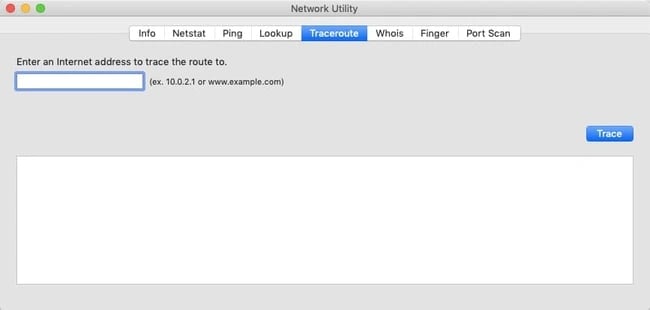
If this sounds new to you, that’s because you’ve been using domain names to reach websites. While you can access a website using its IP address, most Internet users prefer to use domain names or by going through search engines.
Pro Tip: To find your device’s IP address, you can also type “what’s my IP address” into your search browser.
3. What does HTTP mean?
HyperText Transfer Protocol (HTTP) is what connects our website request to the remote server that houses all website data. It’s a set of rules (a protocol) that defines how messages should be sent over the Internet. It allows us to jump between site pages and websites.
If I type a website into my web browser or search for something through a search engine, HTTP provides a framework so that the client (computer) and server can speak the same language when they make requests and responses to each other over the Internet. It’s essentially the translator between you and the Internet — it reads our website request, reads the code sent back from the server, and translates it for us in the form of a website.
4. What is coding?
Coding refers to writing code for servers and applications using programming languages. They’re called “languages” because they include vocabulary and grammatical rules for communicating with computers. They also include special commands, abbreviations, and punctuation that can only be read by devices and programs.
All software is written in at least one coding language, but languages vary based on platform, operating system, and style. All languages fall into one of two categories: front-end and back-end.
Pro Tip: Sometimes, you’ll see that businesses are seeking a full-stack developer. This means that you have expertise in both the front and back-end.
5. What does front-end mean?
Front-end (or client-side) is the side of a website or software that you see and interact with as an Internet user. When website information is transferred from a server to a browser, front-end coding languages allow the website to function without having to continually “communicate” with the Internet.
Front-end code allows users to interact with a website and play videos, expand or minimize images, highlight text, and more. Web developers who work on front-end coding work on client-side development.
6. What does back-end mean?
On the contrary, the back-end (or server-side) is the side that you don’t see when you use the Internet. It’s the digital infrastructure, and to non-developers, it looks like a bunch of numbers, letters, and symbols.
There are more back-end coding languages than front-end languages. That’s because browsers — at the front-end — only understand HTML, CSS, and JavaScript, but a server — at the back-end — can be configured to understand pretty much any language.
7. What is a CMS?
A content management system (CMS) is a web application or a series of programs used to create and manage web content. (Note: A CMS isn’t the same thing as a site builder, such as Squarespace or Wix.)

While not required to build a website, using a CMS makes things easier. It provides the building blocks (like plugins and add-ons) and lets you create the structure with your code.
Pro Tip: Your CMS is often used for ecommerce and blogging, but it’s useful for all types of websites.
8. What is cybersecurity?
There are always malicious actors looking to find vulnerabilities in websites to expose private information, steal data, and crash servers. Cybersecurity is the practice of securing data, networks, and computers from these threats.
The methods used by hackers are constantly evolving, as are the security measures taken to defend against them. Failing to understand how your site could be targeted could result in disaster.
As a result, a basic understanding of cybersecurity best practices is critical for effective web development. You should also carry out security audits on a consistent basis. This will ensure that your website doesn’t fall victim to bad actors attempting to steal your information.